Apply below command on the terminal it should solve the issue:
Set-ExecutionPolicy -Scope CurrentUser -ExecutionPolicy Unrestricted
Set-ExecutionPolicy -Scope CurrentUser -ExecutionPolicy Unrestricted


![clip_image002[5]](https://potifar5000.files.wordpress.com/2015/08/6b221-3-prerequisitesofinstallingworkflowmanager.png "clip_image002[5]")
![clip_image004[5]](https://potifar5000.files.wordpress.com/2015/08/873d3-4-installingtheworkflowmanager.png "clip_image004[5]")


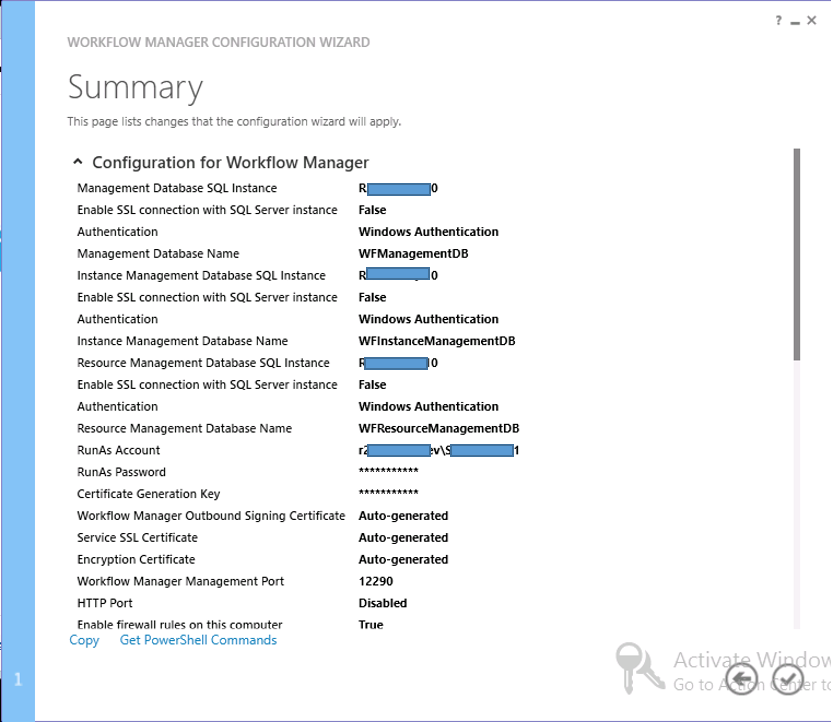


![clip_image002[7]](https://potifar5000.files.wordpress.com/2015/08/1c9d3-22-installingsqlserverexpress2008r2servicepack2.png "clip_image002[7]")
![clip_image004[7]](https://potifar5000.files.wordpress.com/2015/08/clip_image0047.jpg "clip_image004[7]")


![clip_image002[9]](https://potifar5000.files.wordpress.com/2015/08/clip_image0029.jpg "clip_image002[9]")

Ctrl + P
|
Quick Open, Go to File…
|
Ctrl + Shift + P
|
Show Command Palette
|
Ctrl+Shift+N
|
New window/instance
|
Ctrl+Shift+W
|
Close window/instance
|
Ctrl+,
|
User Settings
|
Ctrl+K Ctrl+S
|
Keyboard Shortcuts
|
Ctrl+X
|
Cut line (empty selection)
|
Ctrl+C
|
Copy line (empty selection)
|
Ctrl+Shift+K
|
Delete line
|
Ctrl+Enter
|
Insert line below
|
Ctrl+Shift+Enter
|
Insert line above
|
Ctrl+Home
|
Go to beginning of file
|
Ctrl+End
|
Go to end of
|
Ctrl+G
|
Go to Line
|
Ctrl+Shift+Tab
|
Navigate editor group history
|
Alt+Click
|
Insert cursor
|
Ctrl+`
|
Show integrated terminal
|
Ctrl+Shift+`
|
Create new terminal
|
|
Product
|
Article
|
Download
|
Impact
|
Severity
|
Supersedence
|
|
Microsoft
SharePoint Enterprise Server 2016
|
Remote
Code Execution
|
Critical
|
4462155
|
||
|
Microsoft
SharePoint Foundation 2010 Service Pack 2
|
Remote
Code Execution
|
Critical
|
4461580
|
||
|
Microsoft
SharePoint Foundation 2013 Service Pack 1
|
Remote
Code Execution
|
Critical
|
4461596
|
||
|
Microsoft
SharePoint Server 2010 Service Pack 2
|
Remote
Code Execution
|
Critical
|
|||
|
Microsoft
SharePoint Server 2013 Service Pack 1
|
Remote
Code Execution
|
Critical
|
4462139
|
||
|
Microsoft
SharePoint Server 2019
|
Remote
Code Execution
|
Critical
|
4462171
|
Event Receivers
|
Workflows
|
Can be Executed
Synchronously or Asynchronously.
|
Can be Executed
only Asynchronously which means when an action is completed.
|
Since it is
executing in both modes we can cancel the action which is going to be
occurred.
|
Once an action is
started you cannot stop the operation.
|
Can't be
initiated manually
|
Can be initiated
automatically or manually.
|
Logs are not
possible
|
Log can be
written in workflows
|
Can be used in
actions that needs to be completed immediately based on logic (Immediate
execution)
|
Can be used in
actions that will take even months or years to complete.( Long running)
|
no state is maintained
|
Workflow
maintains state.
|
Triggered on
Synchronous or Asynchronous events.
|
Triggered only on
Creation/Change/deletion events.
|