Copyright for:
https://potifar5000.wordpress.com/2015/08/19/install-and-configure-the-workflow-manager-for-sharepoint/
SharePoint Server 2013 brings a major advancement to workflow: enterprise features such as fully declarative authoring, REST and Service Bus messaging, elastic scalability, and managed service reliability.
SharePoint Server 2013 can use a new workflow service built on the Windows Workflow Foundation components of the .NET Framework 4.5. This new service is called Workflow Manager and it is designed to play a central role in the enterprise. Processes are central to any organization and workflow is the orchestrator of processes.
The SharePoint 2010 Workflow platform has been carried forward to SharePoint Server 2013. All of your workflows that were built by using SharePoint Server 2010 will continue to work in SharePoint Server 2013.
In SharePoint Server 2010 the workflow engine installed automatically with the product. This continues to be the case with the SharePoint 2010 Workflow platform in SharePoint Server 2013. If you simply install SharePoint Server 2013 and do not install and configure Workflow Manager then you will have a nearly identical experience with building workflows as you did in SharePoint Server 2010.
The SharePoint 2013 Workflow platform only becomes available to you, and your tools, after you download and install the new Workflow Manager service and configure it to communicate with your SharePoint Server 2013 farm.
SharePoint Designer 2013 includes new functionality designed specifically for Workflow Manager. In SharePoint Designer 2013 this new platform is known as the SharePoint 2013 Workflow platform. These new features include:
- A visual workflow development experience that uses a Visio 2013 add-in
- A new action that enables no-code web service calls from within a workflow
- New actions for creating a task and starting a task process
- New coordination actions that let you start a workflow built on the SharePoint 2010 Workflow platform from a workflow built on the SharePoint 2013 Workflow platform
- A new Dictionary type
- New workflow building blocks such as Stage, Loop, and App Step
Workflow Manager brings a new class of workflow to SharePoint Server 2013. Workflows built by using Workflow Manager can take advantage of several new capabilities. These include enterprise features such as:
- High Density and Multi-Tenancy
- Elastic Scale
- Activity / Workflow Artifact Management
- Tracking and Monitoring
- Instance Management
- Fully Declarative Authoring
- REST and Service Bus Messaging
- Managed Service Reliability
[Source]
*This configuration is for HTTP only. The HTTPS configuration will be covered in later posts.
Preparation
Before you install the Workflow Manager, make sure that the corresponding SharePoint farm is up and running. Use the same setup user as you did for the SharePoint installation.
Before you install the Workflow Manager, make sure that the corresponding SharePoint farm is up and running. Use the same setup user as you did for the SharePoint installation.
*Note that the below result is also applicable to Project Server.
Download WorkflowManager.exe here. Click on the WorkflowManager.exe to setup by a Web Platform Installer 4.5
Download WorkflowManager.exe here. Click on the WorkflowManager.exe to setup by a Web Platform Installer 4.5
*This is the latest version at the time of writing. The below steps will be identical when a new version is released.


Workflow Manager
![clip_image002[5]](https://potifar5000.files.wordpress.com/2015/08/6b221-3-prerequisitesofinstallingworkflowmanager.png "clip_image002[5]")
Prerequisites for installing Workflow Manager
![clip_image004[5]](https://potifar5000.files.wordpress.com/2015/08/873d3-4-installingtheworkflowmanager.png "clip_image004[5]")
Installing the Workflow Manager


Choose Configure Workflow Manager with Default Settings (Recommended)

Complete fields to indicate SQL server and generate a Certificate Key
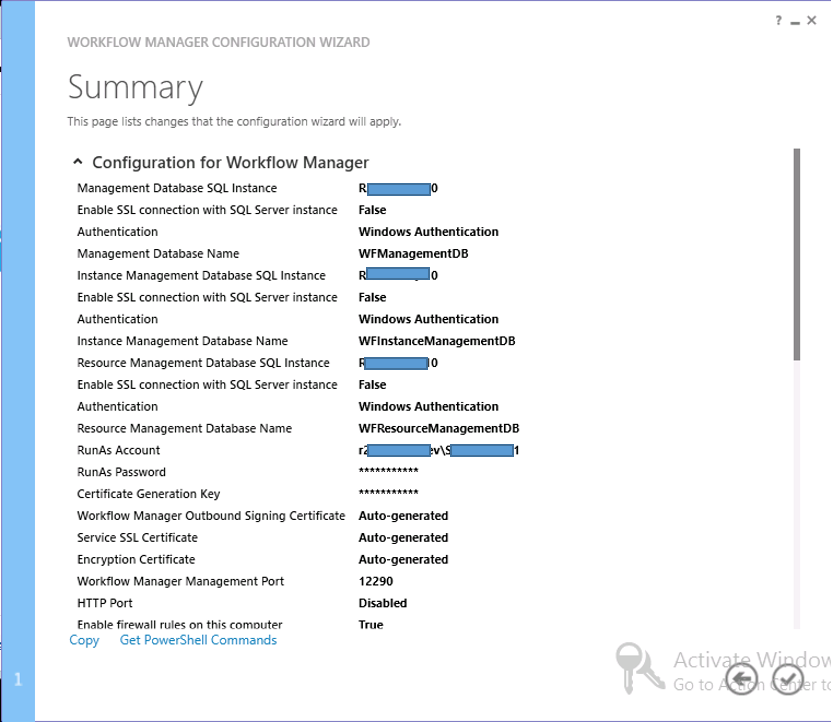

Created and Configured Service Bus farm, Service Bus gateway and farm management database


Workflow Manager, Service Bus 1.0, Execute ASP.NET iis Registration tool and Workflow Client were successfully installed

Service Bus and Workflow database were created

WorkflowMgmtPool and Workflow Management Site
![clip_image002[7]](https://potifar5000.files.wordpress.com/2015/08/1c9d3-22-installingsqlserverexpress2008r2servicepack2.png "clip_image002[7]")
Install Windows Azure SDK, PowerShell, Cross-platform Command Line Tools
![clip_image004[7]](https://potifar5000.files.wordpress.com/2015/08/clip_image0047.jpg "clip_image004[7]")
Items Installed.
Register Workflow:
Open Sharepoint management shell as administrator:
Register-SPWorkflowService –SPSite “http://YourSQLServer” –WorkflowHostUri “http://YourSQLServer:12291” –AllowOAuthHttp

Installation done.
To test, open SharePoint designer and connect to the SharePoint Site:

To verify, create a new site workflow. If the SharePoint 2013 workflow option is listed, then the installation was a success:
![clip_image002[9]](https://potifar5000.files.wordpress.com/2015/08/clip_image0029.jpg "clip_image002[9]")
And DONE!